

Automated Processing for Crystal Reports
Tired of running your Crystal Reports by hand? Use Report Commander to automate your report processing.
Set parameter values
You can configure Report Commander to pass in the parameter values needed by your report.
Dynamic values at run-time
You can use variables and functions to insert dynamic information (such as calculated dates) in parameters, file names, etc.
Configure reports once and have them automatically pull data for the right time period each time you run them.
Override database logins
Report Commander can point your report to a different data source at runt-time. For example, to use your production database instead of the development database connection saved in the report.
Automated exporting and printing
Automatically export your report to PDF, Excel, or any other format supported by Crystal Reports, or print to a printer.
Report distribution
E-mail your exported reports, or upload using FTP or SFTP.
Project-based or command-line-driven
Choose the approach that works best for you: keep your settings in a project file, or drive Report Commander using command-line options.
BYO Scheduler
Report Commander is designed to fit into your existing automation workflow and does not have built-in scheduling capabilities. If you need a nice scheduler we sell one, but you can also use something simple like the Windows Task Scheduler.
Stop doing all the work yourself
Let Report Commander automate your reports
Project-Based or Command-Line-Driven
Project Mode
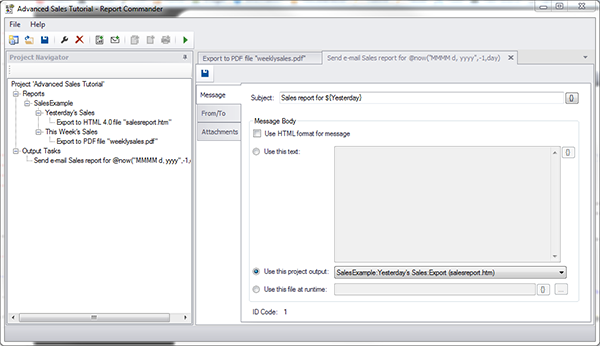
In project mode, a project file is used to store the settings needed to process reports. A project can contain any number of reports, and each report can be exported/printed to any number of destinations using the same or different parameters. Exports from multiple reports can be combined in a single e-mail message.
To use Report Commander in project mode, you use the Project Editor to create or modify a project. From the Project Editor you can also preview your report and test your export settings.
Once you have constructed a project, you can configure your scheduler or other automation tool to run the project using the Project Runner.
Command-Line Mode
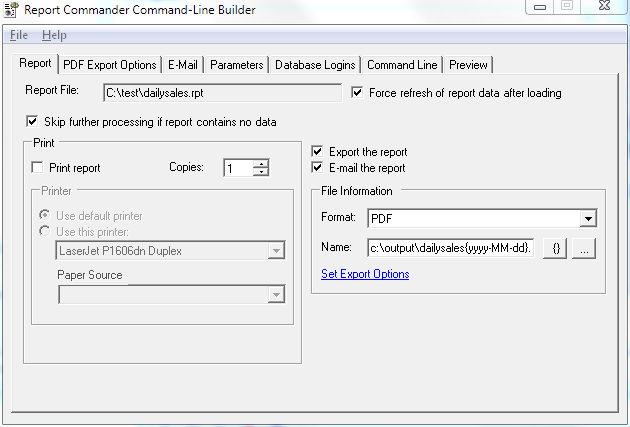
In command-line mode, you give Report Commander all the information it needs to process a report using command-line options. Because this mode does not use any configuration files, it is very easy to call Report Commander from an automation tool, batch file, script, or other application that needs to change parameters dynamically or generate export commands on-the-fly.
The Command Line Builder is a graphical tool that helps you select processing options and construct the command line that is used to execute your report using the Command Runner.
Report Commander can automatically use the current date (or a different date calculated based on the current date) in report parameters. For example, you can configure Report Commander to automatically pass yesterday's date to your report each time you run it, without having to modify the Report Commander options each day.
Learn More
Check out the user guide, download a free trial, or get in touch.
