
Job Scheduling and System Automation
Event-Driven Response Framework
adTempus uses an event-drive response mechanism that allows you to create jobs that respond to error conditions and other situations.
At various points during execution of the job, adTempus fires predefined events. For example, events are fired:
- When the job starts
- When a program is executed by the job
- If a program fails
- If a job fails
- If a job has been waiting too long to start
- If a job's scheduled execution is missed
- At many other points
For each one of these events, you may define Responses, which determine the action(s) adTempus will take when the event is fired. adTempus offers the following actions:
- The Job Control Action can restart a job or job step, run or abort a job, or hold or release a job
- The Notification Action can send notification messages
- The File Capture Action can capture output files produced by the job and save them as part of the job history
- The Script Action can execute a script to perform any processing you require that is not covered by any of the other actions
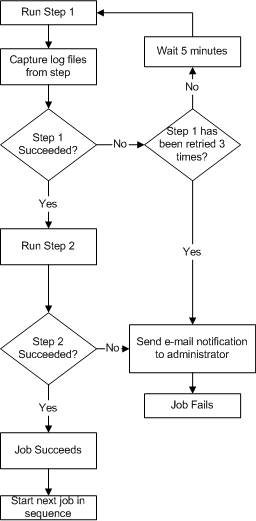
Using Events and Responses you can build complex conditional logic into your jobs. For example: