

Job Scheduling and System Automation
Logging, Reporting, and Auditing
Logging, Reporting, and Auditing
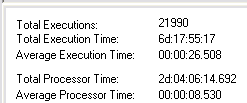
adTempus retains information for each execution ("instance") of a job. This information includes the start time, end time, CPU time, peak memory usage, and status of the job and of each step within the job.
adTempus maintains a message log (similar to the Windows Event Log) that contains any error or warning messages reported for the job.

This history information is available for review in the adTempus Console, and is stored in the adTempus database where it can be retrieved using common database reporting tools.
You may specify, for each job, the length of time (or number of instances) that adTempus should retain the history.
Auditing and Versioning
adTempus also includes an optional auditing capability, which logs an audit message (including the date/time and identity of the user) each time an object is created, modified, deleted, or manually executed.
Snapshots can be created before each change, allowing for comparison of the before and after versions. This also allows objects to be reverted to an earlier version.
Reporting
adTempus includes several reports, and a built-in report designer that allows users to design their own reports.
